I had a great week this time around (quarantine productivity!).
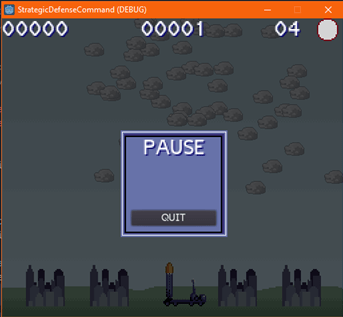
Most important is the near focus on the arcade experience for the game. I realized sometime this past week that some of the processes and objects for that experience can easily feed the storyline campaign. So, with that in mind, I added a pause function. Handily, the game will hide enemies on the screen, to mitigate player abuse. The pause also includes a quit button, which will immediately terminate the game.
Regarding the quit, my travels in the interspace revealed a good way to execute this:
func _notification(note):
if note == MainLoop.NOTIFICATION_WM_QUIT_REQUEST:
print("Confirming...")
get_tree().quit() # default behavior
By default, get_tree().quit() immediately shuts the program when called. By adding this function, you can process other code, before the quit is called (for example, asking the user to confirm that she did, in fact, want to quit). So I’ll be adding in a confirmation dialog at that print statement.
Also added radar spoofs of enemy weapons, which are visible when the radar is on. No system is perfect, after all. Adding these spoofs also gave me an opportunity to move around the GD Script code governing the radar. However, I think it is still opaque (I can’t look at the table of contents and figure out where exactly I put it), so I’ll have to move it to a separate controller sooner rather than later. The radar spoofs also drove me to re-do the cloud generation script and spawner. Previously, they spawned on the far right and moved left. Now they spawn in the right-third of the screen and move left. I also increased cloud generation, politely suggesting use of the radar. I also randomized (to a certain extent) the strike location for enemy missiles. Formerly, they were bang on the center – so it was fairly easy to guess which was the “real” enemy among the spoofs. The spoofs themselves are also randomized, so it is somewhat harder. I also tweaked player rotation speeds, making them a tad faster.
Finally, I added a new placeholder for the launcher, based on the MIM-104 PATRIOT system in use in the U.S. (and other places). The sprite was created in Aseprite using, you probably guessed, ARQ-4 template.
Oh! I didn’t even write down in my notes (or type them?). I also added a quick tutorial (really, a list of commands and some flavor text) that appears when you start the game.
So – what’s next?
The next big lift will be tracking (easy enough), displaying (most easily), and saving (uh-oh) high-score information. I’ve already done some digging into this so it will be a step-by-step build of the system. Get the score, save the file to the local file system, load it when you start, and so on. Thinking about it now, I should probably also re-look these text boxes, I could probably build some efficiencies there as well.
Lots to do, see you next time!
Next Steps: ARCADE MODE
- High-score tracking:
- Text-box
- File writing
- Enemy radar counter.
- Art:
- Bigger, badder clouds
- Sound/Music
- Future Fixes:
- New radar controller node?
- City explosions hard-coded at center, change?
- Quit confirmation dialog
- Text-box scene instanced in-game for high-score, start, reset, and pause
 Tired Fox Projects