Interesting couple of weeks here!
The big news, though relatively small thinking about it, is that I’ve implemented a confirmation dialog box (Yes/No) and a text input box. Sounds simple enough, but the trick was figuring out how to use yield in GDScript. I think I have a good enough handle on it, having implemented it for both boxes.
The problem was this: you’re playing the game and you want to quit. So you try to quit, but you want/expect a confirmation box. OK, we can display one but GDScript runs the quit command before logging the confirmation button click. In GDScript, you’ve asked it to display the box with the button and then quit. How do you ask GDScript to wait?
Through yield. Below, I’ve handled the programming in 3-parts. It begins with the quit notification received by the main scene. It then has the GUI confirm the request through a confirmation dialog with two buttons (Yes/No), it waits for the GUI to “confirm.” The GUI sets the text for the dialog and waits for the dialog to “complete.” The dialog issues a complete once the Yes or No button has been recorded. Then the GUI hides the dialog and signals complete, which allows the scene to progress by extracting the decision from the GUI.
The code snippet below is for the main scene:
#main scene
if notif == MainLoop.NOTIFICATION_WM_QUIT_REQUEST:
    pause(0) #pauses the game
    $GUI.getConfirm("Quit?") #display the dialog box
    yield($GUI, "confirmed") #wait for the "confirmed" signal
    var decision = $GUI.getConfirmation() #now, get the data
    if decision == true:
        get_tree().quit() # default behavior
    else:
        resume()
This snippet is from the GUI:
#GUI
func getConfirm(contextText):
	$ConfirmDialog.setText(contextText)
	$ConfirmDialog.show()
	yield($ConfirmDialog, "completed") #wait for the "completed signal"
	$ConfirmDialog.hide()
	emit_signal("confirmed")
And then the code for the confirm dialog is here:
#confirmation dialog
func _on_YesButton_pressed():
	response = true
	emit_signal("completed")

func _on_NoButton_pressed():
	response = false
	emit_signal("completed")
The input text box is simpler as it is exclusively handled by the GUI node. In that two-step process, the GUI waits for the user to “complete” entering text and then proceeds to display (and later, save) the text on screen. This is for the high scores.
The yield took me some time to wrap my head around, effectively you’re asking code executing in some function to wait for a signal (or state, really) to be emitted at a target object (GUI waiting for confirmation at the Dialog).
So with those two general items sorted, the game can now display high scores and player initial! I also wrote a simple file manager to track high scores and users. Most importantly, the file persists through game sessions so it can be loaded with the next play through.
What else did I work on?
I did a lot of refactoring code, housekeeping. I moved most of the score and label handling code from the main scene to the GUI. I also create a new “FreefallBombManager” node in the EnemyBombSpawn and moved the relevant code out. Since I’ll be working on additional enemies, I wanted to start separating out code.
I also identified and fixed a minor bug. Evidently, there were ghost players flying around, it would occur when the player intercept one enemy en route to another. I discovered that the “explosion” was happening at the original destination. I don’t remember what the problem was now, but fixed!
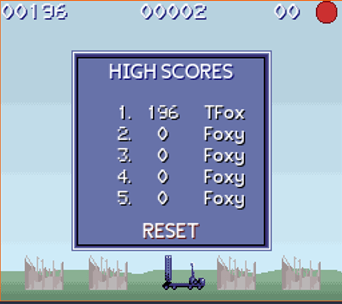
Tracking, displaying, and saving/loading high scores and players wasn’t too difficult (thanks to the Godot Docs). My implementation was too simply export the scores and players as an array to a comma-delimited (CSV) file. Since it would only be 10 elements large (5 score, 5 players) I hard-coded the numbers. A screen-shot is below.
***SEVERAL HOURS LATER***
Well. I am a little cranky. I found a really irritating bug in the text input dialog (involving “yield”) that I mentioned earlier. The problem was: the original solution worked fine for when there was a new high score (dialog for your initials, wait, show the new high scores). But it didn’t work at all if you didn’t make a high score.
I thought: easy-fix, add in the same signal “completed” and it would simply skip the text box and show the high scores, as-is. Not at all. And I have no idea why.
If I ever figure it out I’ll (or if someone else does, please, please) drop a comment.
BUT, I did (eventually) find a work around. In my original logic, I asked the scene to ask the GUI to check highscores (and do the text box if there was a new one), then asked the scene to ask the GUI to show the highscores.
In the new formulation, the scene just asks the GUI to check the highscores. The GUI does and then it shows the highscores on the completion signal, whether there was a new highscore or not. It works. Personally, I don’t like this solution as I’m effectively asking a function to do two things (check the high scores and then show them). I’m getting around that by using a signal, but that’s a bit opaque. Oh well, it works and I can revisit it later as necessary.
Here’s the solution:
#GUI
func processAndShowScore():
	for oldScore in highScores.slice(0,4):
		if score > int(oldScore):
			var listPos = highScores.find(oldScore)
			highScores.insert(listPos, score)
			highScores.remove(5)
			$InputDialog.setText("New high score!")
			$InputDialog.show()
			yield($TextInputDialog, "completed")
			highScores.insert(listPos+5, $InputDialog.getText())
			highScores.pop_back()
			emit_signal("highCheckDone")
			return
	emit_signal("highCheckDone")

func _on_GUI_highCheckDone():
	showScores()
Whew. I really didn’t anticipate yield being as big a challenge as it was. So, I think for the next cycle I’m going to focus on some of the art. Clouds. I need some clouds in my life. I also (remembered? discovered?) that I had apparently changed the scale for everything (art asset-wise) to be double what I had drawn it. Which would be fine until I refactored some of the enemy code, throwing it off by the scaling. This isn’t a bug, more of a quirk, I suppose. The fix though would be to either scale the game down by half or make new art assets that are double the size. I like the latter I think.
Until next time!
Next Steps: ARCADE MODE
- High-score tracking:
Text-boxFile writing
- Enemy radar counter.
- Art:
- Bigger, badder clouds
- Sound/Music
- Future Fixes:
- New radar controller node?
- City explosions hard-coded at center, change?
Quit confirmation dialog- Text-box scene instanced in-game for high-score, start, reset, and pause

